
Introduction
When an IGET ONE stops producing vapour, the cause may not be immediately obvious. The display might still illuminate, the device may appear intact, or the battery indicator may show a reading even though the device no longer operates normally.
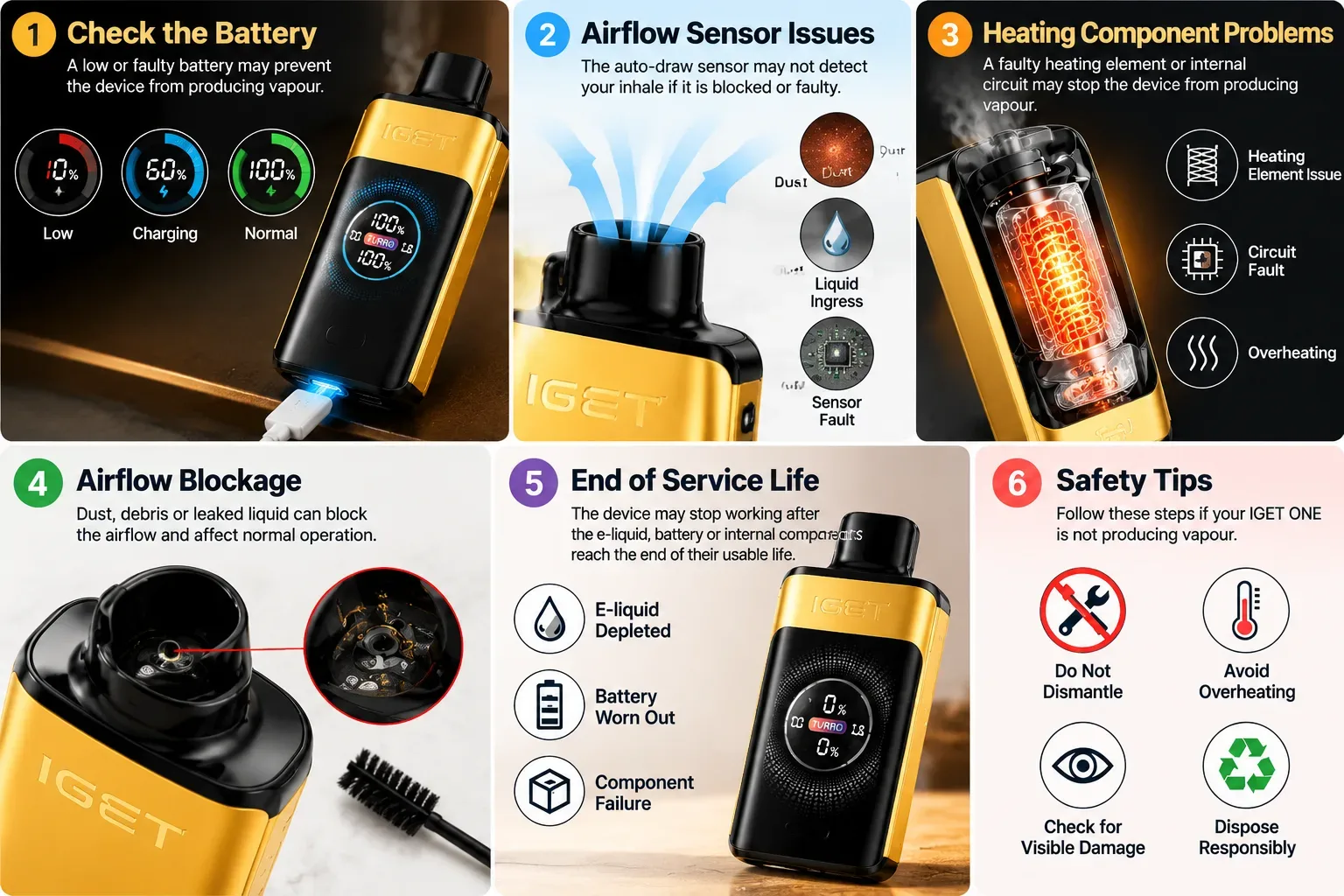
Several factors can contribute to this problem, including battery faults, airflow sensor issues, internal electrical failures and damage to the device.
This guide explains the possible causes of an IGET ONE not producing vapour, how to recognise potential faults and what safety precautions Australian consumers should understand.
1. Battery Problems
The battery supplies the electrical energy required by a vaping device. If the battery is depleted, damaged or unable to deliver power correctly, the device may stop operating.
Possible warning signs include:
The display does not illuminate.
The device becomes unresponsive.
Battery readings appear inconsistent.
The device stops operating unexpectedly.
A display or battery indicator cannot independently confirm that the battery is functioning correctly. Battery-related symptoms may also result from an internal electrical fault.
If the device has a rechargeable battery, follow the manufacturer's instructions. Never charge a device that is swollen, leaking, visibly damaged or unusually hot.
2. Airflow Sensor Problems
Some vaping devices use an automatic airflow sensor to detect inhalation and activate their internal electronics.
If the sensor or its associated circuitry malfunctions, the device may fail to activate even when the battery appears to have power.
Potential causes include:
Dust or debris entering an opening.
Liquid reaching internal electronic components.
Damage following a drop or impact.
A fault in the sensor or control circuit.
These symptoms do not prove that the airflow sensor is defective. A sealed device should not be opened or dismantled to investigate the cause.
3. Heating Element or Internal Circuit Failure
An electronic vaping device relies on a heating element and control circuitry to operate as designed.
If an internal component fails, the device may appear to have power but produce no vapour.
Possible symptoms include an unresponsive device, inconsistent operation, unusual odours or abnormal heat.
However, the absence of vapour alone cannot establish whether the heating element, electrical connection or control circuit is responsible.
Do not attempt to access internal wiring, replace embedded components or bypass electrical protection systems. If an internal fault is suspected, stop using the device and seek appropriate guidance.
4. Airflow Obstruction
An obstructed airflow path can interfere with normal device operation.
Dust, debris or leaked liquid may affect an opening or internal passage. A noticeable change in airflow may indicate a mechanical problem, although other faults can produce similar symptoms.
Avoid inserting pins, needles or other objects into the mouthpiece or airflow openings. Do not pour water into the device or attempt to dismantle it.
If the airflow remains restricted, stop using the device rather than attempting an improvised repair.
5. The Device May Be Damaged
Physical damage can affect a device's battery, sensor, electrical connections or casing.
Damage may occur after a drop, exposure to liquid, excessive heat or improper storage.
Check the exterior for visible cracks, leakage, swelling or other signs of damage without opening the casing.
If the device becomes unusually hot, emits smoke or develops a strong chemical smell, move away from the immediate area and avoid handling it unnecessarily. Call Triple Zero (000) in Australia if there is a fire or immediate danger.
6. The Device May Have Reached the End of Its Service Life
A device may stop functioning when its battery, liquid supply or an internal component reaches the end of its usable life.
An advertised puff count is an estimate under particular testing conditions. It does not guarantee a specific number of activations for every device.
Actual operating life may vary because of battery condition, operating conditions and component performance.
A device that stops working should not be opened, refilled or modified unless it is specifically designed for such servicing and the manufacturer provides appropriate instructions.
7. What Should You Do If Your IGET ONE Stops Working?
If an IGET ONE produces no vapour, the following safety measures are appropriate:
Stop using the device temporarily. Avoid repeated activation attempts when the cause is unknown.
Inspect the exterior. Look for visible damage, leakage, swelling or unusual heat.
Consult the product instructions. Check the meaning of any display symbols or indicator lights.
Avoid dismantling the device. Do not remove the battery, expose internal wiring or attempt improvised repairs.
Seek appropriate assistance. Contact the manufacturer or a suitable service provider for guidance.
Arrange responsible disposal if necessary. In Australia, check your local council or a collection facility that explicitly accepts complete vaping devices with embedded batteries.
The ACCC advises consumers not to put lithium-ion battery products in household rubbish or ordinary recycling bins because damaged batteries can cause fires in waste collection and processing facilities.
Frequently Asked Questions
Why is my IGET ONE not producing vapour even though the screen works?
A functioning screen does not prove that the battery, heating element, airflow sensor and internal circuitry are all operating correctly. An internal fault may prevent normal operation.
Can a battery fault cause an IGET ONE to stop working?
Yes. A depleted or damaged battery may prevent the device from operating. However, similar symptoms can result from other electrical or mechanical faults.
Can an airflow sensor stop working?
Yes. A malfunctioning sensor or associated circuitry may prevent a device from activating. The exact cause cannot be confirmed from the absence of vapour alone.
Why might a device stop working before its advertised puff count?
Advertised puff counts are estimates rather than guarantees. Battery performance, operating conditions and internal component faults can affect actual service life.
Should I dismantle an IGET ONE to find the problem?
No. Opening a sealed device can expose electrical components and damage its battery. Do not attempt to remove or repair an embedded battery.
How should I dispose of a faulty vaping device in Australia?
Check your local council's disposal guidance or contact a collection facility that explicitly accepts complete vaping devices. Do not place the device in household rubbish or kerbside recycling.
Conclusion
An IGET ONE that is not producing vapour may have a battery problem, an airflow sensor fault, an obstructed airflow path, physical damage or an internal component failure.
Because these devices contain electrical components and batteries, it is important not to assume that every fault can be resolved through simple troubleshooting. Avoid dismantling or modifying the device, follow applicable safety instructions and arrange suitable disposal when necessary.
Disclaimer: This article provides general technical and safety information. It does not diagnose an individual device or replace manufacturer instructions.